

- Tools for job seekers
- Tools for employers
- Job Board Administration
- Customization & Design
- SEO & Marketing
- Integrations & Plugins
- Hosting & Security
Tools for job seekers
- Job Search
Job seekers can refine their search and easily identify the exact roles they are looking for using the search function. This tool includes category, location, and salary range.Simple Application Process
The platform was built to allow for the simplest job application process. All your job seekers need to do is attach a resume file and write a small cover letter.Private job board
Restrict “job search” and “job view” to registered job seekers only.Login with LinkedIn, Facebook or Google
Simplify the sign-in process for your site visitors by enabling login using their LinkedIn, Facebook or Google accounts. - Job Alerts
Job alerts allow for automated emails to be sent with specific and customized job postings. When new jobs match the set criteria, our system sends an email alert with relevant offers straight to their inbox.Save Jobs
Enables job seekers to save jobs, so that they can refer back to them when they have time to finish an application.Resume Parsing
As an easy auto-fill option to improve results and save time, resume parsing automatically fills in candidates online resume from the files they upload.
Tools for employers
- Job Posting
Employers can choose to receive applications by email or opt to redirect applicants to a certain URL to complete the application process. This makes the job posting easy and effective.Company Profile Page
Employers can create a branded company profile page that includes their logo, company information, website, images, videos, and all active jobs posted. This can be a useful tool to attract more applicants.Employer Dashboard
The Employer Dashboard provides the necessary tools to manage posted jobs, view applications, site analytics, and manage profile settings in the dashboard.Company Users (Subaccounts)
Employers can invite their teammates to view and post jobs for the same company. - Searching candidates by profiles & resumes
Our smart keyword search system carefully scans each candidate’s profile and each listing for the right keywords, enabling your employers to always find the best candidates.Applicant Tracking
Our “kanban” style board simplifies the categorization of applications by hiring status. This tool surfaces candidate information, contact applicants, and insert notes for each application.Resume Alerts
Employers can subscribe to resume alerts and receive daily, weekly or monthly emails with new job seeker profiles matching their search criteria.
Job Board Administration
- Products
Products can be created on your job board to charge employers a fee items like job postings and candidate searches. Other services, like featuring a company profile, can be created and turned into revenue producing products as well.Discounts
Run promotions by offering dollar-based or percentage-based discounts for your customers.Accept online payments
Both job seekers and employers will enjoy a simple and seamless checkout process. SmartJobBoard comes with Stripe and PayPal built-in payment gateways allowing you to accept Visa, MasterCard, Discover, American Express, and PayPal.Customize Listing Fields
Add or remove fields from resume or job posting forms as you please, with one-click editing capabilities.Automatic Job Import
Import jobs from other websites using an easy XML feed.Conversion Tracking in Google Analytics
Automatic Google Analytics integration allows you to easily track different conversions in your GA account. - Setup Recurring Subscriptions
Set up recurring billing options for your employers. Once they set up recurring payments, your customers will no longer have to log in to their accounts to renew or extend services.Admin Dashboard
The built-in admin dashboard shows you how your job board is doing at a glance, including sales, job & resume postings, job alerts, and applications sent.Manage Employers, Jobs and Resumes
Super Admin capabilities, provide you with full control over user profiles and listings—easily view, add, edit or delete any user profile or posting.Manage Site Content
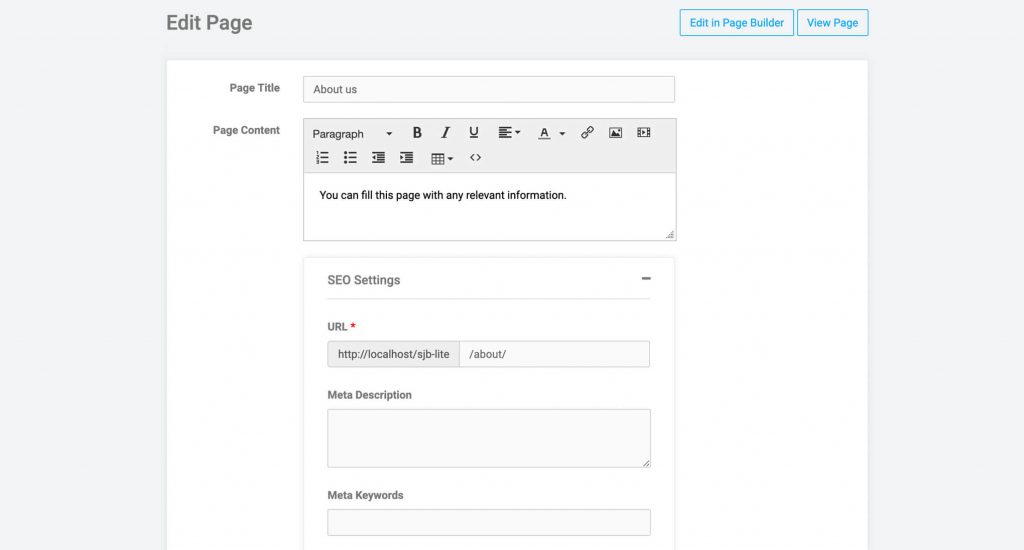
Create unlimited static content pages; to explain your terms of service, privacy policy, or pricing and easily link these pages to your website.Performance Reports
Performance reports let you see which employers and jobs attract the most traffic. Share these reports with your employers to show them their performance metrics.
Customization & Design
- Responsive Templates
Our responsive themes work perfectly on any device and screen size—allowing your customers to post and search for jobs on your job board wherever and whenever they want.Page Builder Tool
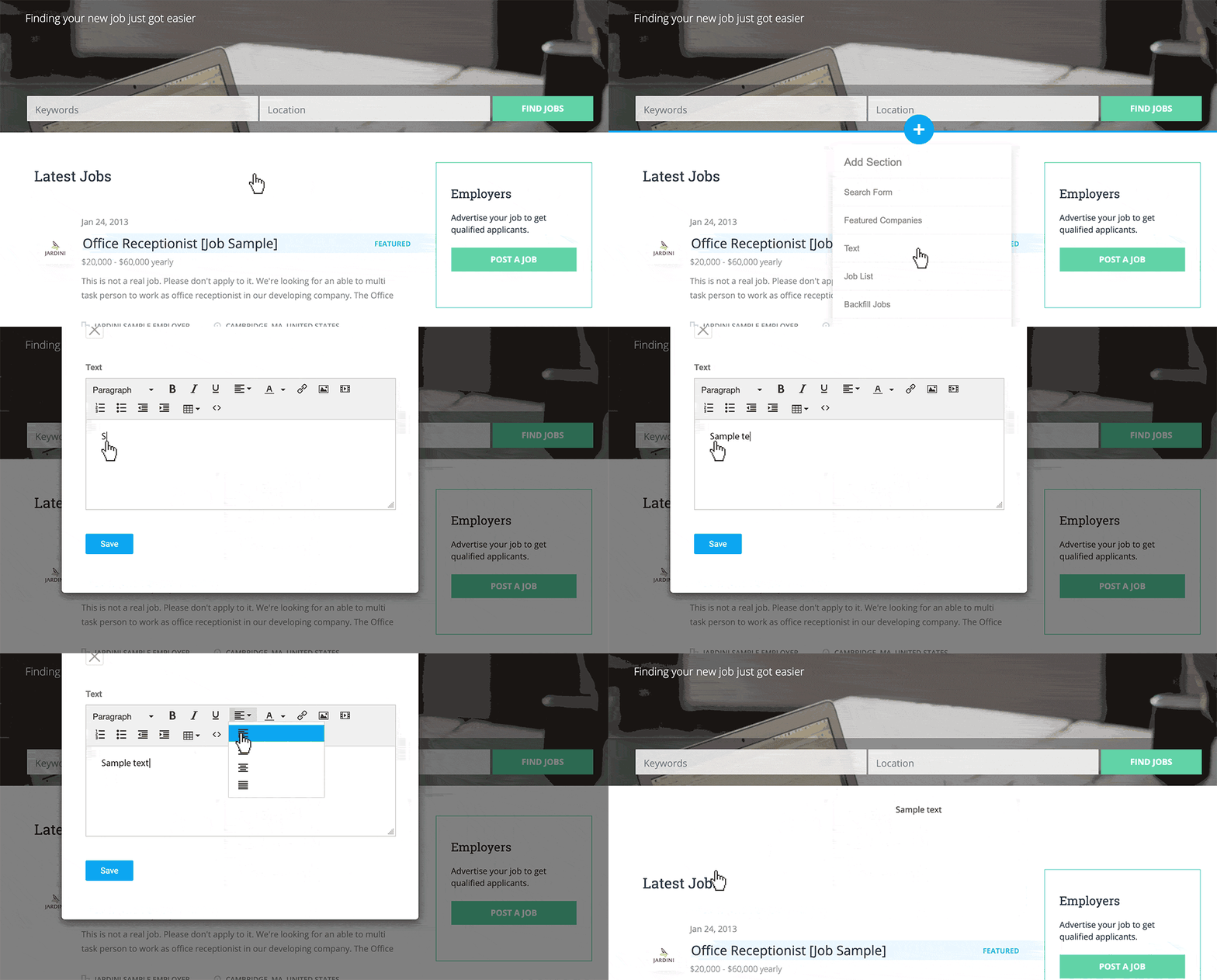
Our intuitive and custom page builder grants you absolute freedom in deciding what your site will look like. Drag and drop widgets, add or delete, with just a few clicks.Customize the design of your job board
No design or coding skills required. Upload your logo, customize your company information, choose your colors, and modify your brand images.Banners ads placement
Generate additional revenue through 3rd party ad networks with Google AdSense. Banner ads can be easily uploaded to your job board by copy pasting the line of code, or with a static image. - Language translation
Quickly translate any phrase or word on your job board in minutes.Navigation Menu
Customize the navigation menu per your needs, including: links to external websites or static content pages from your navigation menu.Custom CSS and JS
Create a unique look and feel by adding custom CSS and JavaScript code to make your job board stand out.
SEO & Marketing
- Job category pages
To improve your website ranking, your job category page URLs, titles, and meta descriptions are automatically optimized.Custom page URLs and Descriptions
Easily set your own page URLs and meta descriptions for maximum visibility on search engines—like Google, Yahoo and Bing.301 Redirects
This functionality is particularly useful for job boards migrating to SmartJobBoard. To keep the SEO juice flowing for your existing pages you may set 301 (SEO friendly) redirects from your old URLs to your new URLs.Blogging Platform
Post your articles and announcements with our pre-built blogging platform. - Google for Jobs compatibility
SmartJobBoard integrates with Google job search automatically. No additional steps needed to index your job postings.Sitemap
To help with your search engine index and ranking, SmartJobBoard automatically generates a sitemap.xml file, including all your listings and pages.Email marketing
One of the best ways to stay connected to your network is through email. See our Mailchimp integration.
Integrations & Plugins
- Job backfill
Integrate and display jobs from aggregators such as Indeed, ZipRecruiters and Talroo.API
SmartJobBoard API allows your developers to integrate your job board with 3rd party platforms. It gives you access to the main job board data such as jobs, resumes, employers, job seekers, and orders.Single Sign-On
Single sign-on (SSO) is an authentication scheme that allows a user to log in with a single ID and password to any of several related, yet independent, software systems. This means that your users (e.g. members or students) can sign in to your job board by using their individual membership account.Zapier Integration
Zapier is an online automation tool that makes it easy to connect a great variety of apps together. It allows to automate repetitive tasks without coding or relying on developers to build the integration. -
Advanced job distribution with Appcast
Send your jobs to Appcast for distribution in their network of job boards. Appcast is using Intelligent, Programmatic Job Ad Distribution to optimize your spendings.Mailchimp integration
Notify your customers of upcoming promotions or new products with the built-in MailChimp email marketing plugin.Intercom integration
Use Intercom as a live chat and advanced communication and user interaction tool on your website.Top Resume Integration
Partner with Top Resume writing service and receive a commission every time your job seeker’s sign up for their resume re-writing services.Disqus plugin
Build a strong dedicated community around your site by allowing your site users to leave comments on your blog.
Hosting & Security
- Cloud Servers
Our enterprise-grade cloud hosting ensures that your job board site will load quickly and reliably for customers anywhere in the world.Continuous Update Releases
Whenever we add new features or improvements to SmartJobBoard, your job site is automatically updated.Auto Backups
Our scheduled automated backups keep all your data safe.Free SSL certification
Unlike other job board platforms, SmartJobBoard provides an SSL certificate at no cost. - Invisible reCaptcha
Invisible reCaptcha from Google protects your site from bots and spam attacks, by automatically analysing user behavior and separating humans from bots.GDPR Compliance
SmartJobBoard welcomes the GDPR as an important step forward to enhance data protection. We provide legally binding guarantees that any and all data shared with us is afforded the highest level of protection. More info here